
Is Your Code LLM-Friendly?
km map --color-by llm paints red the code where an agent should struggle. We tested it with 47 bugs. On code the model already knew, red barely mattered. On code it had never seen, red cost a third more.
km map --color-by llm colors every file by its health score and shows you where a coding agent can work unsupervised and where you’d better keep an eye on it. The idea comes from CodeScene1, which argues that agents are reliable on code with a Code Health of 9.5 or higher.
In the first post on this blog, we said code quality gets measured, not taken on faith. That goes for Kimün’s own claims too, so we put the map to the test.
The map
km map draws your code as an enclosure diagram, Adam Tornhill style: every directory is a circle holding its files, and each file’s area grows with its lines of code. With --color-by llm, the color comes from the km score grade: green at 95 and up (LLM-friendly), gray at 70 and up (proceed with caution) and red below 70 (LLM risk). The 95 is our stand-in for CodeScene’s 9.5, though the two tools compute their scores differently. You can change the thresholds in .kimun.toml.
km map --color-by llm --html map.htmlWe ran it on nine well-known projects:
| Project | Score | Red | Gray | Green | Where the risk piles up |
|---|---|---|---|---|---|
| phoenix | A (92.7) | 3% | 66% | 31% | assets/js/phoenix/ |
| kimun | A (91.4) | 2% | 74% | 24% | src/docs/ |
| flask | B+ (83.2) | 47% | 29% | 23% | src/flask/sansio/ |
| express | B+ (83.2) | 42% | 41% | 17% | lib/ |
| ripgrep | C+ (76.0) | 53% | 35% | 12% | crates/core/flags/ |
| click | C (72.5) | 39% | 55% | 6% | src/click/ |
| django | C (70.3) | 57% | 31% | 13% | django/contrib/admin/ |
| black | D+ (65.6) | 77% | 17% | 6% | src/black/ |
| redis | F (50.5) | 86% | 10% | 4% | src/ |
Share of lines of code in each color. We left out profiling/ in black and deps/ in redis.
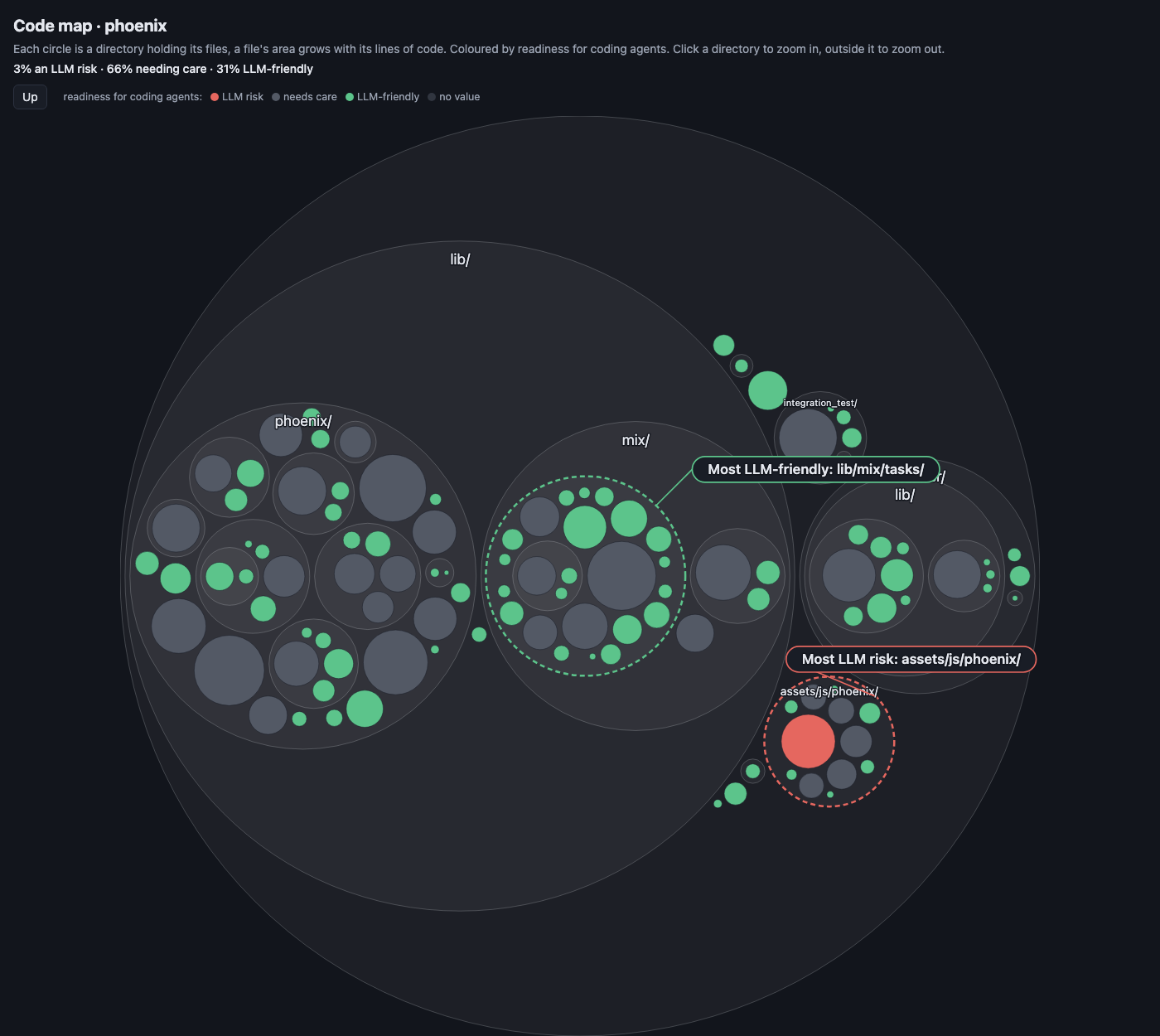
phoenix (A, 92.7). Almost everything is gray or green. The only red file is assets/js/phoenix/socket.js, scoring 59.6.
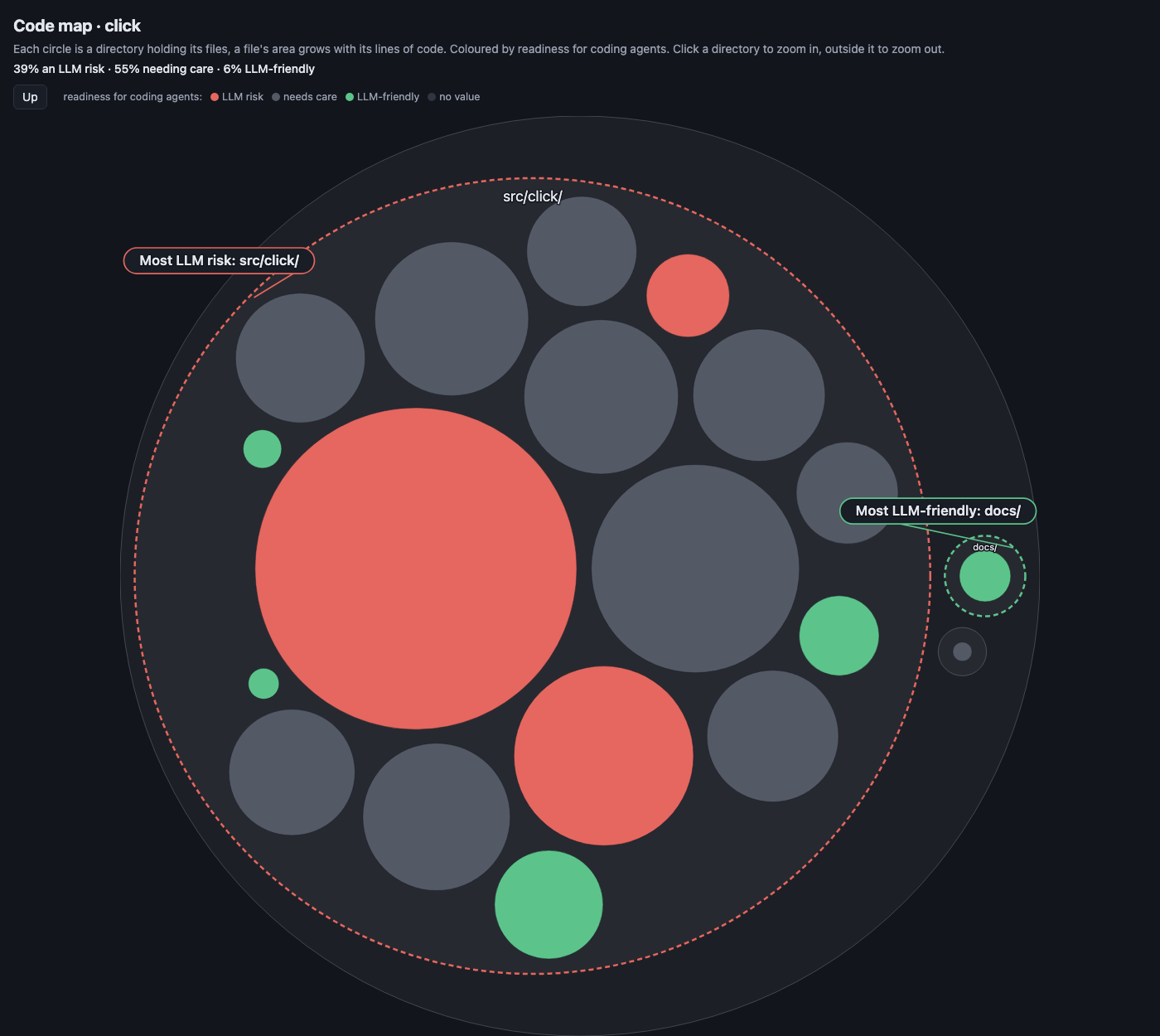
click (C, 72.5). The big red circle is core.py: almost 2,000 lines of code scoring 29.7.
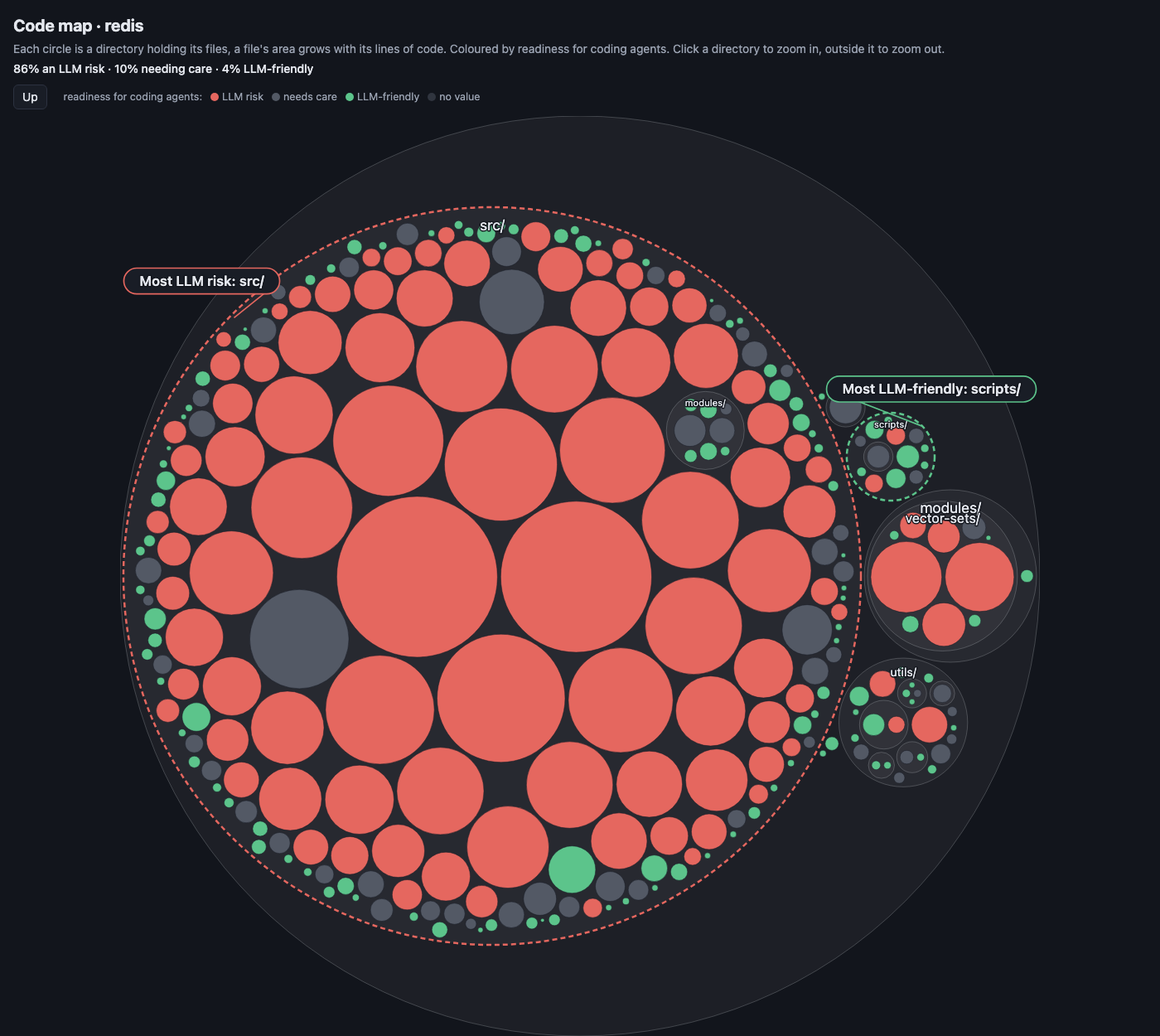
redis (F, 50.5). src/ is a sea of red, led by redis-cli.c with 9,569 lines of code scoring 16.9.
A few things jump out:
- Red clusters at the core. In click, nearly all the risk lives in
core.py. In black, it’slinegen.py, the heart of the formatter. The code that matters most is the code that’s grown the most. - A good overall grade doesn’t buy you a green map. Flask gets a B+, yet almost half its lines are red: lots of small, clean files pull the average up and hide the big ones.
- Highly respected projects come out red. ripgrep, the search engine inside VS Code, has half its lines below 70. That should make you side-eye the threshold.
If the hypothesis holds, an agent should sweat bullets in click/core.py and breeze through flask/config.py. That’s something we can measure.
Round one: click, flask and black
We designed and built the experiment with Claude Opus, and the agents that fixed the bugs were Claude too. Since that’s one model grading its own family, we published all the data and every agent’s report.
In three Python projects with solid test suites, we picked 13 green files (scoring 85 or higher) and 12 red ones (below 65). In each we planted a one-token bug, the kind that slips right past code review (== for !=, and for or), that broke between 1 and 15 tests. Every bug got its own isolated copy of the project, with a fresh git history so git diff wouldn’t give it away, and its own agent (Claude Sonnet), told to fix it without touching the tests. At the end, we reran the tests ourselves.
| Green (n=13) | Red (n=12) | |
|---|---|---|
| Fix applied (suite passes) | 11/13 | 12/12 |
| Tool calls (median) | 6 | 7 |
| Cumulative input tokens (median) | 355K | 389K |
| File size (median) | 385 lines | 1,145 lines |
The agents found all 25 bugs and spent just 10% more tokens on red files. With 25 cases, that’s noise.
The reason is simple: the agent doesn’t read the 4,000-line file. It runs the tests, reads the traceback, greps for the function and reads the 40 lines around it. As long as a test points the way, the file’s complexity doesn’t matter.
There was one exception: black/linegen.py. The failing test showed one extra space in the output, far from the guilty line. To connect symptom and cause, the agent had to understand how the formatter works: it read more, tried hypotheses, wrote debug scripts. It made 36 tool calls and burned 2.8 million tokens, eight times the median. It still got it right, but it cost a bundle.
That’s the key. Red doesn’t flag where the agent will fail. It flags where understanding the code gets expensive, and the agent only pays that price when the task forces it to understand.
But something kept bugging us. click, flask and black are public, hugely popular projects, and almost certainly part of Claude’s training data. An agent that remembers how core.py is laid out doesn’t need to understand it. If the model knew the code by heart, red never had a chance to charge.
Round two: code the model has never seen
We needed code the model hadn’t seen. We used sc-cli, a command-line tool for Shortcut written in Rust. Its repo is public but has exactly one star, so it’s very unlikely any model memorized it. It was also written almost entirely with an agent, by asking for things and taking whatever came back. The map gives it away: an F- (40.0), with 87% of the lines in the red.
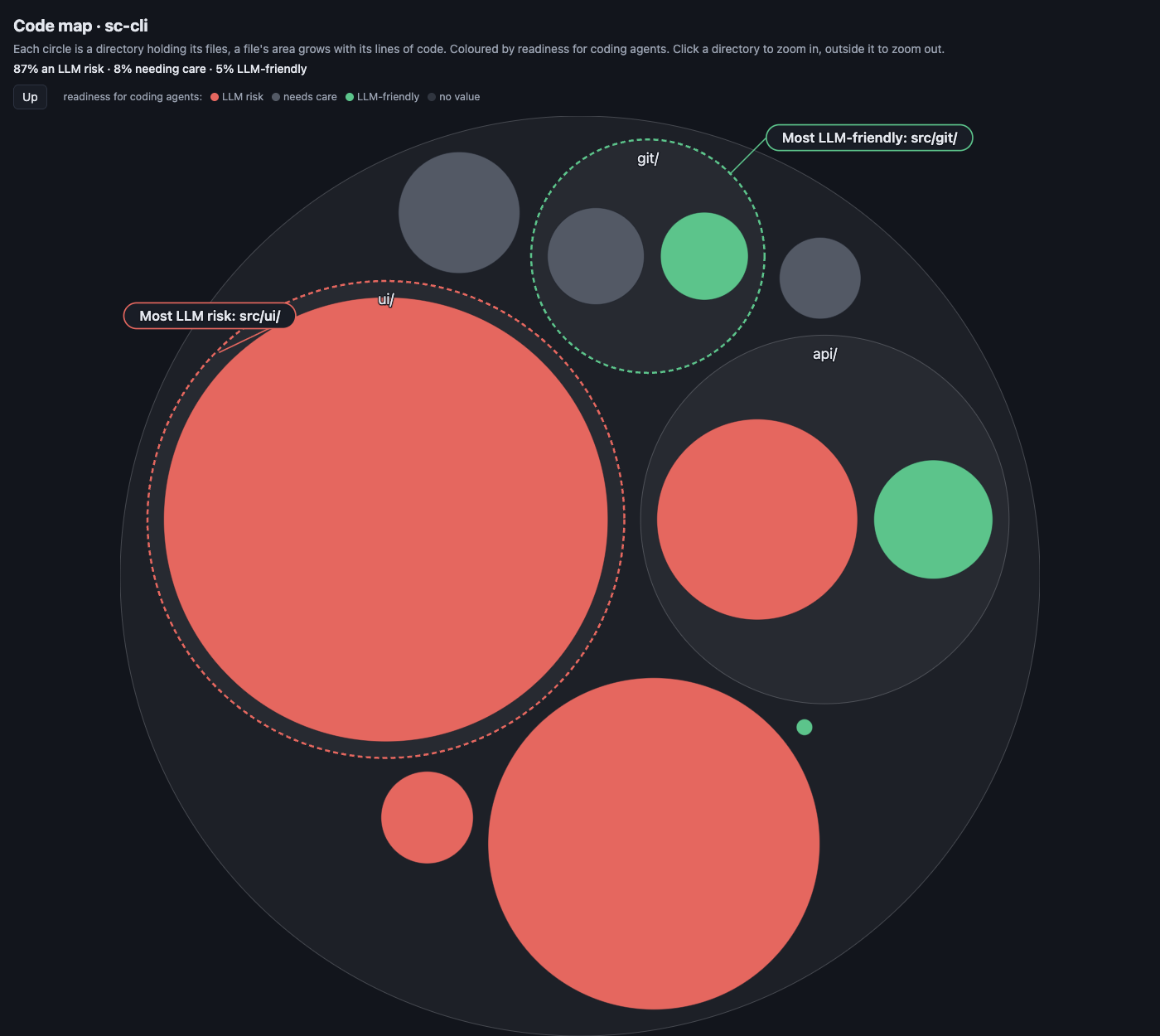
sc-cli (F-, 40.0). The big red circles are ui/mod.rs (2,974 lines of code, scoring 15.3), main.rs (30.7) and api/client.rs (57.3). The little that’s healthy lives in git/.
This time we generated the bugs with kalku, a mutation testing tool, and kept the ones that broke between 1 and 15 tests: 10 in high-scoring files (git/, at 92.5 and 99.5) and 12 in the three red ones. Same model, same prompt.
| Green (n=10) | Red (n=12) | |
|---|---|---|
| Fix applied (suite passes) | 10/10 | 11/12 |
| Tool calls (median) | 6 | 8 |
| Cumulative input tokens (median) | 356K | 473K |
| File size (median) | 591 lines | 2,123 lines |
This time red sent the bill: 33% more tokens and two more tool calls. Pair up the trials, and the red one cost more than the green one 90% of the time, with 6-in-10,000 odds that it’s chance.
The one agent that didn’t find its bug was working in main.rs. The bug sat in a pagination loop, and the failing test ran the whole program, whose output depends on the machine’s configuration. The agent combed through the code, found nothing suspicious and blamed the environment. Once again, a symptom far from its cause.
The two rounds tell the same story from opposite ends. On code the model probably knew, red barely mattered. On code it had never seen, red cost a third more, even though the tests were still pointing the way.
Don’t take the agent’s word for it
In round one, the two fixes that failed were on green files, and the code wasn’t to blame. In both, the agent found the bug, wrote the fix with a sed -i that doesn’t work on macOS and, in the very same step, reported “the full suite passes.” It never waited for the output. If we hadn’t rerun the tests, we’d have counted 25 out of 25.
That lesson beats any threshold: when an agent says the tests pass, trust, but verify. Run them yourself, or let your CI do it.
What these experiments don’t measure
- It’s 47 cases, one run per bug, with a single model. Run-to-run variance can be large.
- sc-cli has few distinct files. The green bugs sit in two files and the red ones in three, so some of the gap could come from those particular files rather than their color.
- We changed several things at once: language, project and mutation tool.
- The task plays to the agent’s strengths: there was always a failing test. New features, refactors and bugs with no test pointing at them are a whole different ballgame.
So how should you read the map?
Is your code LLM-friendly? Our answer: friendly means cheap to understand. Red doesn’t predict that the agent will fail. It shows where it’ll charge you more, in tokens, in time and in wrong turns, once it has to understand instead of remember or follow a lead. With that in mind:
- Cross the map with your history. A red file nobody touches costs nobody anything. One that changes every week, you pay for again and again.
km map --color-by hotspotsandkm hotspotsshow you which. - Invest in tests that shorten the distance between symptom and cause. A test that points at the line makes even a red file cheaper.
- Measure the code your agents write. sc-cli is what happens when nobody does: every change accepted without a look runs up the bill for the next agent that touches it.
- Verify outside the agent, with CI and a gate like
km score --fail-if-worse, so code health doesn’t slip without anyone noticing.
What’s next
These two rounds left us with two questions, and in the next post we’ll show the experiments that answer them:
- What happens when no test helps? In both rounds, a test told the agent where to look. But sc-cli’s suite missed 255 of the 304 mutants kalku threw at it. With those bugs, the agent only gets a description of the symptom, and we suspect red charges a lot more.
- How much does memory matter? sc-cli suggests quite a bit, but we changed too much at once. We’ll rerun round one on click, flask and black with every name changed, so the model can’t recognize them. The
km scoregrade barely moves, because Kimün measures structure, not names.
Maps made with Kimün 0.44. Data and scripts for both rounds at lnds/kimun-llm-experiment.